Merhaba genç maker'lar! Güç sizinle olsun! Bugün laboratuvarımızda sadece devre kurmayacak, aynı zamanda efsanevi Star Wars (Yıldız Savaşları) evrenine müzikal bir yolculuk yapacağız. Minik bir hoparlör olan "buzzer" kullanarak o ünlü Imperial March (Darth Vader'ın müziği) melodisini kodlayacağız. Üstelik müziğin ritmine göre yanıp sönen kırmızı LED'lerimizle tam bir ışın kılıcı atmosferi yaratacağız. Junior ve Pro Maker'ların en sevdiği eğlenceli projelerden birine hazırsanız, devreyi kurmaya başlayalım!
Gerekli malzemeler
- 1 adet Arduino Uno
- 1 adet Breadboard (Devre tahtası)
- 1 adet Buzzer (Mini hoparlör)
- 2 adet Kırmızı LED
- Yeteri kadar Jumper Kablo
- (Küçük bir Maker ipucu: Şemada olmasa da, LED'lerinizin ömrünü uzatmak için eksi bacaklarına 220 veya 330 Ohm direnç eklemek her zaman harika bir alışkanlıktır!)
Adım adım yapım
1. 1. Bölüm
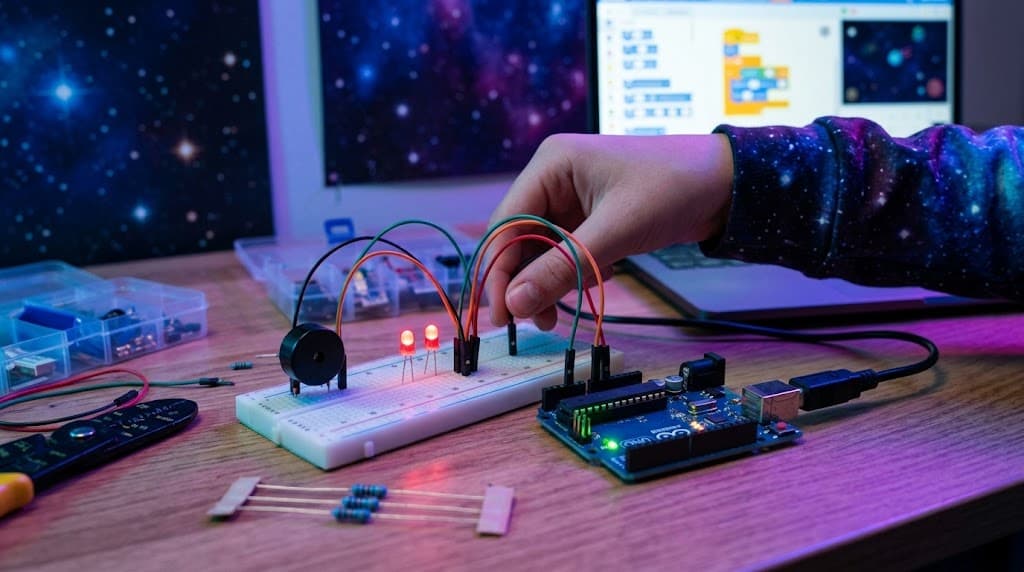
Yapım anlatımı İlk olarak breadboard'umuzun alt kısmındaki eksi (-) hattına, Arduino'nun GND (toprak) pininden siyah bir jumper kablo çekerek güç dağıtım hattımızı oluşturalım. Buzzer'ımızı breadboard'a yerleştirelim. Buzzer'ın uzun bacağını (artı kutup) yeşil bir kabloyla Arduino'nun 8 numaralı dijital pinine bağlayalım. Kısa bacağını (eksi kutup) ise az önce oluşturduğumuz breadboard üzerindeki GND eksi hattına bağlayalım. Sıra geldi müziğe ritim tutacak kırmızı ışıklarımıza! İki adet kırmızı LED'i breadboard üzerine takalım. Birinci LED'imizin uzun bacağını (artı) turuncu bir kablo ile Arduino'nun 12 numaralı pinine bağlayalım. İkinci LED'imizin uzun bacağını (artı) yeşil bir kablo ile Arduino'nun 13 numaralı pinine takalım. Son olarak, her iki LED'imizin kısa bacaklarını (eksi) breadboard'daki siyah kabloyla oluşturduğumuz GND (eksi) hattına bağlayarak devremizi tamamlayalım. Bağlantılarımız bittiğine göre kodu yükleyip konseri başlatabiliriz!
Proje kodu
Kodu Arduino IDE'ye aktarın. Pin numaralarını kendi devrenize göre kontrol ettikten sonra karta yükleyin.
const int c = 261;
const int d = 294;
const int e = 329;
const   int f = 349;
const int g = 391;
const int gS = 415;
const int a = 440;
const   int aS = 455;
const int b = 466;
const int cH = 523;
const int cSH = 554;
const   int dH = 587;
const int dSH = 622;
const int eH = 659;
const int fH = 698;
const   int fSH = 740;
const int gH = 784;
const int gSH = 830;
const int aH =   880;

const int buzzerPin = 8;
const int ledPin1 = 12;
const int ledPin2   = 13;

int counter = 0;

void setup()
{
  //Setup pin modes
   pinMode(buzzerPin, OUTPUT);
  pinMode(ledPin1, OUTPUT);
  pinMode(ledPin2,   OUTPUT);
}

void loop()
{

  //Play first section
  firstSection();

  //Play second section
  secondSection();

  //Variant 1
  beep(f,   250);
  beep(gS, 500);
  beep(f, 350);
  beep(a, 125);
  beep(cH,   500);
  beep(a, 375);
  beep(cH, 125);
  beep(eH, 650);

  delay(500);

  //Repeat second section
  secondSection();

  //Variant 2
  beep(f,   250);
  beep(gS, 500);
  beep(f, 375);
  beep(cH, 125);
  beep(a,   500);
  beep(f, 375);
  beep(cH, 125);
  beep(a, 650);

  delay(650);
}

void beep(int note, int duration)
{
  //Play tone on buzzerPin
  tone(buzzerPin,   note, duration);

  //Play different LED depending on value of 'counter'
   if(counter % 2 == 0)
  {
    digitalWrite(ledPin1, HIGH);
    delay(duration);
     digitalWrite(ledPin1, LOW);
  }else
  {
    digitalWrite(ledPin2, HIGH);
     delay(duration);
    digitalWrite(ledPin2, LOW);
  }

  //Stop   tone on buzzerPin
  noTone(buzzerPin);

  delay(50);

  //Increment   counter
  counter++;
}

void firstSection()
{
  beep(a, 500);
   beep(a, 500);
  beep(a, 500);
  beep(f, 350);
  beep(cH, 150);
   beep(a, 500);
  beep(f, 350);
  beep(cH, 150);
  beep(a, 650);

   delay(500);

  beep(eH, 500);
  beep(eH, 500);
  beep(eH, 500);
   beep(fH, 350);
  beep(cH, 150);
  beep(gS, 500);
  beep(f, 350);
   beep(cH, 150);
  beep(a, 650);

  delay(500);
}

void secondSection()
{
   beep(aH, 500);
  beep(a, 300);
  beep(a, 150);
  beep(aH, 500);
  beep(gSH,   325);
  beep(gH, 175);
  beep(fSH, 125);
  beep(fH, 125);
  beep(fSH,   250);

  delay(325);

  beep(aS, 250);
  beep(dSH, 500);
  beep(dH,   325);
  beep(cSH, 175);
  beep(cH, 125);
  beep(b, 125);
  beep(cH,   250);

  delay(350);
}
Hello there, This message arrived through your contact page. If I were a customer, how quickly would I get a call back? The best time to talk to a new lead is the minute they get in touch, before they call a competitor. Our system makes that call for you. When someone requests a call on your site, we call them in about 30 seconds, and you choose who they talk to: 1. You or your staff. Your phone rings and we connect you while they're still on your website. If nobody answers, our AI picks up instead. 2. Our AI, on every call. It handles questions, qualifies them and books the appointment, around the clock, then sends you a full transcript. Test it yourself: visit https://amazingleadgen.com, click the blue phone icon at the bottom right and enter your phone number. We'll call you. The demo is the AI option. Our Basic plan needs no credit card. A real person helps you set it up. It's free for 14 days. Cheers, Ignacio, Amazing Lead Gen Not for you? Opt out here: https://amazingleadgen.com/unsubscribe.aspx?d=maker216.com
Hello there, A quick experiment: this message came through your website's contact form. If I were a real customer, the clock would already be ticking. The best time to call a new lead is the moment they get in touch, before they call a competitor. That's the call we make for you. When a visitor asks for a call on your website, we call them about 30 seconds later, and you decide who they talk to: 1. You or your staff. We ring your phone and connect you while they're still on your website. Miss it? Our AI picks up instead. 2. Our AI voice agent. It answers their questions, qualifies them and books the appointment, around the clock, then sends you the transcript. Hear it for yourself: visit https://boostleadgen.com, tap the blue phone icon in the bottom corner and type in your phone number. It calls you. The demo shows the AI option. You get 14 days free. Our Basic plan needs no credit card. A real person helps with setup. Talk soon, Ward, Boost Lead Gen Not interested? Unsubscribe here: https://boostleadgen.com/unsubscribe.aspx?d=maker216.com